
Menu
How Neural Nova Improved Qwen3-235B Inference Throughput by 2.39X
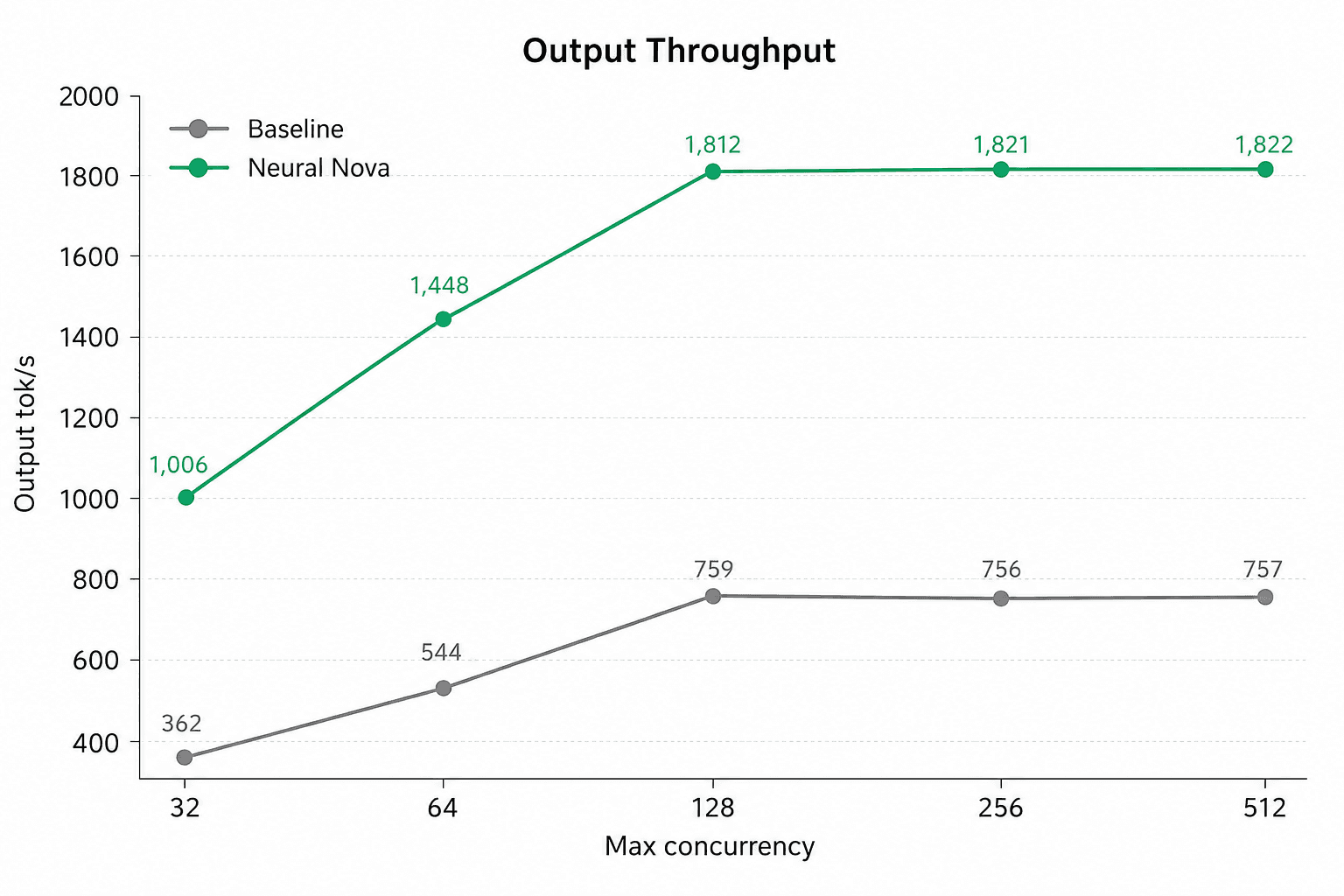
Large language model serving performance is not only determined by the model or the GPU. In production, performance depends heavily on how the serving stack is configured for the actual workload. At Neural Nova, we are building an AI performance optimization platform that turns model deployments into measurable optimization targets. Instead of treating inference engines as black boxes, our platform profiles the workload, identifies the relevant serving constraints, searches the configuration space, and validates improvements across the metrics that matter in production.
In this experiment, we applied that workflow to Qwen3-235B-A22B running on NVIDIA H100 8 GPUs vLLM with tensor parallel size 8. The result was a significant improvement in serving performance:
Output throughput increased from 759.0 to 1,812.0 tokens/s
Request throughput increased from 2.92 to 6.98 requests/s
Mean TPOT decreased from 146.3 ms to 53.9 ms
Mean ITL decreased from 144.3 ms to 53.2 ms
Mean end-to-end latency decreased from 41.8s to 17.6s
That is a 2.39X increase in output throughput and a 57.9% reduction in mean end-to-end latency.This result came from workload-aware vLLM serving optimization. It was not a custom kernel optimization result. The goal was to show that before changing model architecture or adding more GPUs, there is often substantial performance left in how the serving system is configured.
The problem: default serving settings are not always production-optimal
vLLM is already one of the strongest inference engines for LLM serving. It provides efficient batching, KV-cache management, distributed execution, and high-throughput serving capabilities. But default settings are designed to be general. Production workloads are specific.
A real deployment has constraints:
What model is being served?
What hardware is used?
What context length is actually required?
What is the expected request concurrency?
Are prompts short, long, or mixed?
Does the workload reuse common prefixes?
Is the model dense or Mixture-of-Experts?
Is the main objective throughput, latency, cost, or a balance of all three?
The optimal serving configuration depends on the deployment. In this experiment, Neural Nova’s optimization engine tuned vLLM for Qwen3-235B-A22B across 8 GPUs and selected a configuration that included --max-model-len 8192. This benchmark compares default vLLM serving against Neural Nova’s workload-tuned serving configuration, rather than isolating a single parameter. The broader point is that production inference should be optimized around real deployment objectives, not generic defaults.
Neural Nova’s workflow
Neural Nova’s product workflow starts by defining the deployment unit. A deployment unit is the boundary of the workload being optimized. It includes the model, runtime, hardware setup, input and output constraints, context length, precision mode, concurrency target, and performance objective.
For this experiment, the deployment unit was:
Category | Configuration |
|---|---|
Model | Qwen3-235B-A22B |
Runtime | vLLM |
Parallelism | Tensor parallel size 8 |
Metrics | Output tok/s, request throughput, TTFT, TPOT, ITL, E2E latency, duration |
Optimization objective | Improve throughput while preserving or improving latency |
Once the deployment unit was defined, Neural Nova measured the default serving behavior, explored runtime configuration changes, and validated the optimized setup against both throughput and latency metrics. The important part is that optimization was not judged by one number. A configuration that improves throughput while making latency much worse may not be acceptable for production. The system needs to evaluate the full serving profile.
Baseline configuration
The baseline used a standard vLLM serving setup with tensor parallelism across 8 GPUs:
This is a reasonable starting point. It lets vLLM infer many runtime parameters automatically. However, default settings are not always optimal for a specific production workload. In particular, when --max-model-len is not explicitly set, the serving engine may derive the maximum context length from the model configuration. For a large model like Qwen3-235B-A22B, that can affect memory planning, KV-cache capacity, batching behavior, and throughput. This is why workload definition matters. A production deployment should be optimized around the context length, concurrency pattern, latency target, and throughput objective it actually needs.
Neural Nova’s Tuned Configuration
Neural Nova’s optimization engine searched the vLLM serving configuration space for this workload and selected a tuned configuration that improved both throughput and latency.
The tuned configuration adjusted several parts of the serving stack, including:
maximum model length and memory planning
GPU memory utilization
batching capacity
prefill scheduling
prefix reuse
distributed execution
MoE backend selection
Neural Nova’s optimization engine selected a workload-tuned vLLM configuration for this deployment, adjusting memory planning, batching, prefill behavior, prefix reuse, distributed execution, and MoE backend selection. The result was a 2.39× increase in output throughput and a 57.9% reduction in mean end-to-end latency.
Results
The optimized configuration improved every major serving metric.
Metric | Baseline | Optimized | Change |
|---|---|---|---|
Output tok/s | 759.0 | 1,812.0 | +138.7% |
Request throughput | 2.92 req/s | 6.98 req/s | +138.7% |
TTFT mean | 4,304.4 ms | 3,786.8 ms | −12.0% |
TTFT p99 | 16,379.8 ms | 10,526.9 ms | −35.7% |
TPOT mean | 146.3 ms | 53.9 ms | −63.1% |
TPOT p99 | 195.1 ms | 72.6 ms | −62.8% |
ITL mean | 144.3 ms | 53.2 ms | −63.2% |
ITL p99 | 535.7 ms | 240.6 ms | −55.1% |
E2E mean | 41,766.3 ms | 17,589.2 ms | −57.9% |
E2E median | 40,450.2 ms | 17,168.5 ms | −57.6% |
Duration | 342.1 s | 143.3 s | −58.1% |
Mean TPOT dropped from 146.3 ms to 53.9 ms. Mean ITL dropped from 144.3 ms to 53.2 ms. Mean end-to-end latency dropped from 41.8 seconds to 17.6 seconds. This means the optimized configuration was not merely increasing throughput by making requests wait longer. It improved the overall serving behavior of the workload.
Why throughput and latency improved together
In LLM serving, throughput and latency often trade off against each other. Increasing batching can improve total tokens per second, but it can also increase waiting time. Supporting longer context windows can improve flexibility, but it can reduce KV-cache capacity and concurrency. More aggressive scheduling can improve utilization, but it can hurt tail latency if the workload is not balanced correctly.
The goal of Neural Nova’s optimization workflow is to find configurations that improve the deployment objective without creating unacceptable tradeoffs. For this workload, several factors likely contributed to the improvement.
First, the tuned configuration selected a lower maximum model length, which can improve memory planning and effective serving capacity when the workload does not require the model’s full native context window.
Second, increasing GPU memory utilization helped vLLM allocate more memory for serving, including KV cache.
Third, tuning batching limits gave the runtime more room to schedule concurrent work.
Fourth, chunked prefill helped balance prefill and decode work.
Fifth, prefix caching may help when requests share common prefixes, such as system prompts or repeated prompt templates.
Finally, using the Triton MoE backend matters because Qwen3-235B-A22B is a Mixture-of-Experts model. MoE serving behavior can be sensitive to backend implementation and routing overhead.
The exact contribution of each parameter should be measured through ablation. But the combined result shows that workload-aware runtime tuning can create large practical gains.
Scaling across concurrency levels
We also tested how the baseline and Neural Nova-tuned configurations scaled as maximum concurrency increased from 32 to 512. Across every concurrency level, the tuned configuration delivered higher output throughput and request throughput. At concurrency 32, output throughput improved from roughly 362 tok/s to 1,006 tok/s. As concurrency increased, the tuned setup scaled beyond 1,800 output tok/s, while the baseline saturated around 750–760 output tok/s.
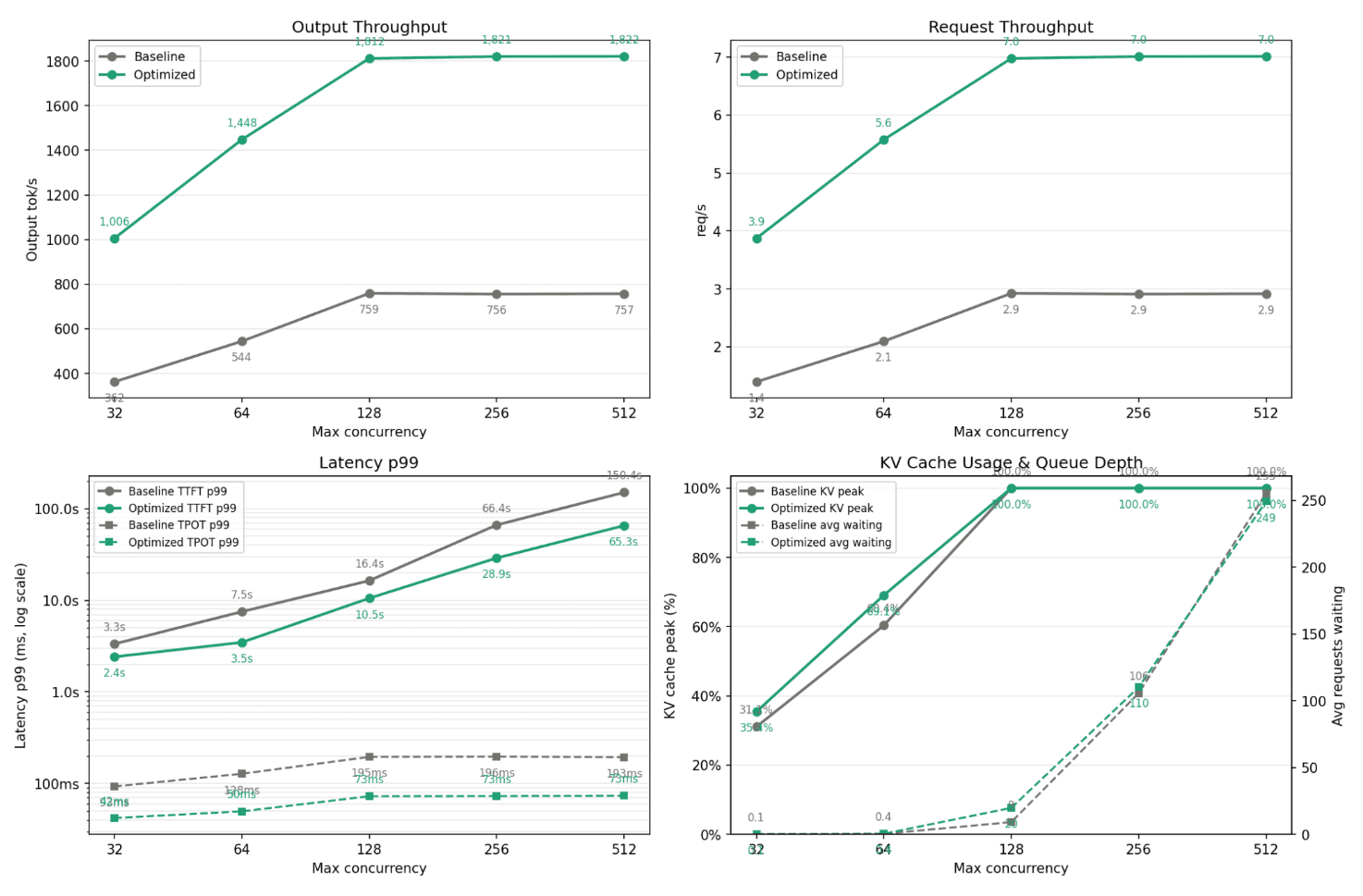
Request throughput followed the same pattern: the baseline saturated around 2.9 req/s, while the tuned configuration reached around 7.0 req/s. Latency also improved under load. At concurrency 512, baseline p99 TTFT reached roughly 150s, while the tuned configuration reduced it to about 65s. TPOT p99 was also lower, around 73 ms versus roughly 193 ms for the baseline. This scaling test shows that Neural Nova’s optimization improved serving behavior across concurrency levels, not just at a single benchmark point.
Why this is not “just changing flags”
It is easy to look at the optimized command and say the improvement came from changing vLLM flags. That misses the product point. The hard part in production is not knowing that parameters exist. The hard part is knowing:
which parameters matter for this workload;
which values are safe to test;
which metrics should be optimized;
which tradeoffs are acceptable;
whether the result is actually better end to end;
whether the configuration remains valid as the workload changes.
This is where Neural Nova’s product direction matters. Neural Nova is designed to own the performance optimization loop:
Define the deployment unit
Establish the model, runtime, hardware, context length, workload shape, and performance objective.Measure the baseline
Run the workload and collect throughput, latency, and tail behavior.Search the optimization space
Explore runtime, graph, operator, and kernel-level optimization opportunities.Validate the result
Confirm that performance improves across the metrics that matter, not only one headline metric.Package the optimized deployment
Produce a configuration or optimized artifact that can be used in the target environment.Maintain performance over time
Revalidate and retune as models, frameworks, drivers, CUDA versions, and hardware change.
This experiment focused on serving-runtime optimization. Other Neural Nova workflows go deeper into operator and kernel-level execution. But the principle is the same: production AI performance should be optimized and maintained at the workload level.
Practical takeaway
The practical takeaway is simple. Before adding more GPUs, make sure your serving stack is tuned for the workload. Large model serving performance depends on more than model size and GPU count. It depends on how the runtime uses memory, schedules requests, batches tokens, handles prefill, manages KV cache, and executes model-specific components such as MoE layers.
For Qwen3-235B-A22B, workload-aware tuning changed the deployment from:
759 output tokens/s to 1,812 output tokens/s
2.92 requests/s to 6.98 requests/s
146.3 ms mean TPOT to 53.9 ms
41.8s mean E2E latency to 17.6s
That is a meaningful improvement in both system capacity and user experience.
Conclusion
Default inference engine settings are a starting point, not the final performance envelope. In this experiment, Neural Nova optimized vLLM serving for Qwen3-235B-A22B on an 8-GPU tensor-parallel setup. The tuned configuration increased output throughput by 2.39× and reduced mean end-to-end latency by 57.9%.
The result shows why performance ownership matters. AI workloads should not be treated as static deployments with fixed default settings. They should be profiled, tuned, validated, and maintained against the actual production objective.
At Neural Nova, we are building the platform to make that possible: turning AI deployments into measurable optimization targets, improving execution efficiency across the serving and kernel stack, and helping teams get more performance out of the infrastructure they already have.