
Introducing AI Engine: our AI CUDA engineer that optimizes your entire AI model automatically.

Introduction
As AI models grow larger and more complex, three bottlenecks stand out: compute capacity, model optimization, and engineering time. Achieving peak performance often means tuning at the GPU kernel level—optimizing memory access, thread scheduling, and tensor operations to fully leverage modern accelerators.
Today, leading AI companies employ large teams of system software engineers to hand-optimize kernels. This process is costly—often $10M+ per quarter—and slow, taking 2–6 months to deliver results. Kernel-level optimization is notoriously difficult, requiring deep expertise in CUDA, GPU architecture, and ML workloads.
Neural Nova AI Engine solves this problem. Our LLM-powered system acts as an autonomous CUDA engineer, automatically profiling, analyzing, and generating optimized GPU kernels. Instead of months of manual tuning, Neural Nova delivers production-ready optimizations in weeks, cutting engineering costs by more than half while unlocking 2–4× speedups in training and inference. This allows teams to focus on innovation rather than months of low-level performance tuning.
AI Engine Workflows
Our AI Engine workflow is designed to be simple and seamless for clients:
Code Intake: Clients upload the PyTorch codebase of their AI model.
Analysis: AI Engine profiles the model, analyzing its structure and computational graph.
Optimization: It generates and applies GPU kernel-level optimizations to maximize performance.
Validation: End-to-end correctness is verified against the client's original PyTorch implementation.
Benchmarking: Performance is measured to quantify speedups.
Delivery: Clients receive a highly optimized CUDA codebase with a Python interface, ready for drop-in use.
With our end-to-end delivery mindset, clients can use our highly optimized CUDA code base out of the box to enjoy fast performance while cutting the GPU cost and energy savings.
Why not using ChatGPT or Gemini?
There’s a major difference between leveraging our AI Engine and using general-purpose LLMs like ChatGPT or Gemini. While those models excel at coding, they struggle with GPU parallelization and low-level optimization, since expertise in GPU architecture, memory hierarchies, and parallel programming is rare and mostly confined to senior engineers and HPC researchers. As a result, achieving meaningful performance gains with general-purpose LLMs still requires expert guidance.
Our AI Engine overcomes this by focusing on dataset enrichment and LLM training. We curate a proprietary CUDA dataset with advanced parallelism techniques, from warp-level computation, memory coalescing, SIMD occupancy optimization, vectorized loads/stores, warp synchronization, to shared memory utilization. We also design custom training algorithms and a feedback loop that exposes the model to PyTorch and CUDA code, error logs, and profiling data, enabling it to internalize GPU optimization knowledge and outperform general-purpose models in real-world tasks.
AI Engine Demonstration
Let us show examples of common ML operations that our AI Engine delivers 3-5X performance improvement compared to Torch compile. There are Conv2d_Min_Add_Multiply and Matmul_Scaling_ResidualAdd.
In our Conv2d_Min_Add_Multiply PyTorch baseline, the code defines a functional module and a model class with input parameters, convolution weights, and bias. Inside the functional module, it calls F.conv2d, applies a min operation, and performs two arithmetic operations on the convolution weights.
We pass this PyTorch code to our AI Engine, which translates and optimizes it into CUDA while preserving correctness.
Examining the generated CUDA code reveals several optimizations.
#pragma unroll: This directive partitions loop workloads across threads at compile time, allowing for parallel execution of partial convolutions and better register utilization.
Explicit loop unrolling: When input sizes are known at compile time, the AI Engine expands the loops into straight-line code. This removes loop overhead, improves instruction-level parallelism, and gives the warp scheduler more opportunities to hide latency—leading to faster execution.
On NVIDIA GPUs, the NVCC compiler can automatically decide which loops to unroll based on register usage, avoiding register spilling. This makes #pragma unroll is generally safe to use, unless explicitly specifying an unroll factor or thread count.
In the host code, AI Engine sets the grid and thread block size—using a default block size of 256, adjustable up to 1024—to achieve good occupancy. In future iterations, AI Engine will analyze warp occupancy for each kernel and dynamically choose the optimal block size for maximum performance.
Before delivering any generated CUDA code, AI Engine runs a correctness check to ensure output matches the baseline PyTorch implementation. This includes verifying output dimensions, numerical accuracy, and enforcing a tolerance of 1e-5 (torch.float32) to guarantee reliable results.
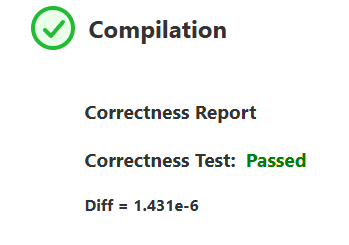
Based on our AI Engine result, the code generated passes the correctness test, below the tolerance threshold, indicating that it can be used against Pytorch baseline code.
On a benchmark test, our AI Engine compares the execution time between toch.compile and our generated CUDA code with 1000 iterations to reduce performance noises.
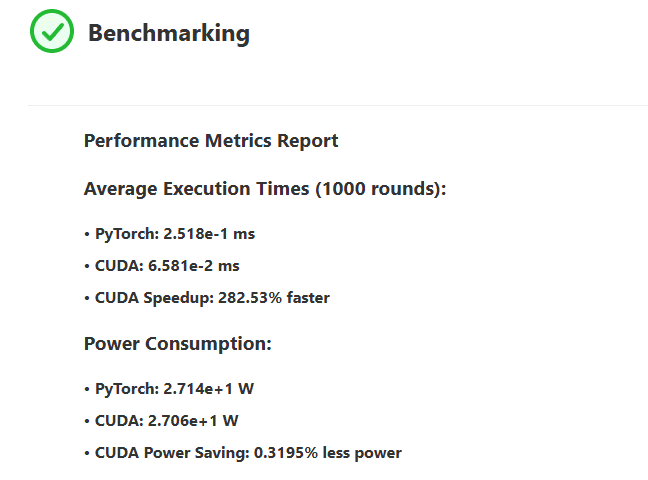
It shows that our CUDA generated code produces 282.53% increased speedups while using identical power usage compared to the torch.compile version. We are spending GPU time much less than Pytorch which translates to lower cost of GPU.
Another operation we will demonstrate is Matmul_Scaling_ResidualAdd. In PyTorch, this involves calling a linear function to perform the matrix multiplication of weights and inputs (plus bias), then creating a new tensor to apply a scaling factor and adding it to the output of the linear operation. On our AI Engine, it generates a CUDA code performing the same operation with several optimization techniques as follows:
Blocked Tiling: The input and weight matrices are divided into TILE_DIM x TILE_DIM tiles to reduce global memory access overhead and improve data locality.
Shared Memory Usage: Tiles of x and weight are loaded into shared memory, which is much faster than global memory. This optimization helps reduce repeated global memory accesses for the same data.
Double Buffering in Shared Memory: Two shared memory buffers (s_x[2] and s_w[2]) are used to overlap memory load with computation to hide latency.
Loop Unrolling: The inner tile multiplication loop (for k in 0..TILE_DIM) uses #pragma unroll to allow the compiler to generate optimized code.
Fused Computation: Bias addition and residual scaling are fused into the final write-back to global memory, reducing extra kernel launches or separate passes over the data.
Given these optimizations, we should expect to gain tangible performance improvements.
Again, correctness is passed.
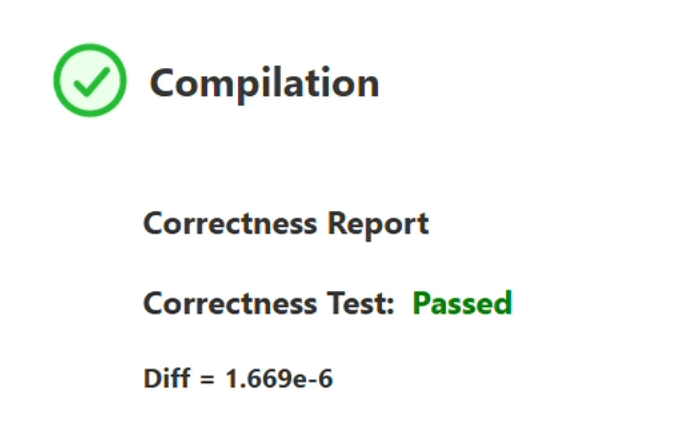
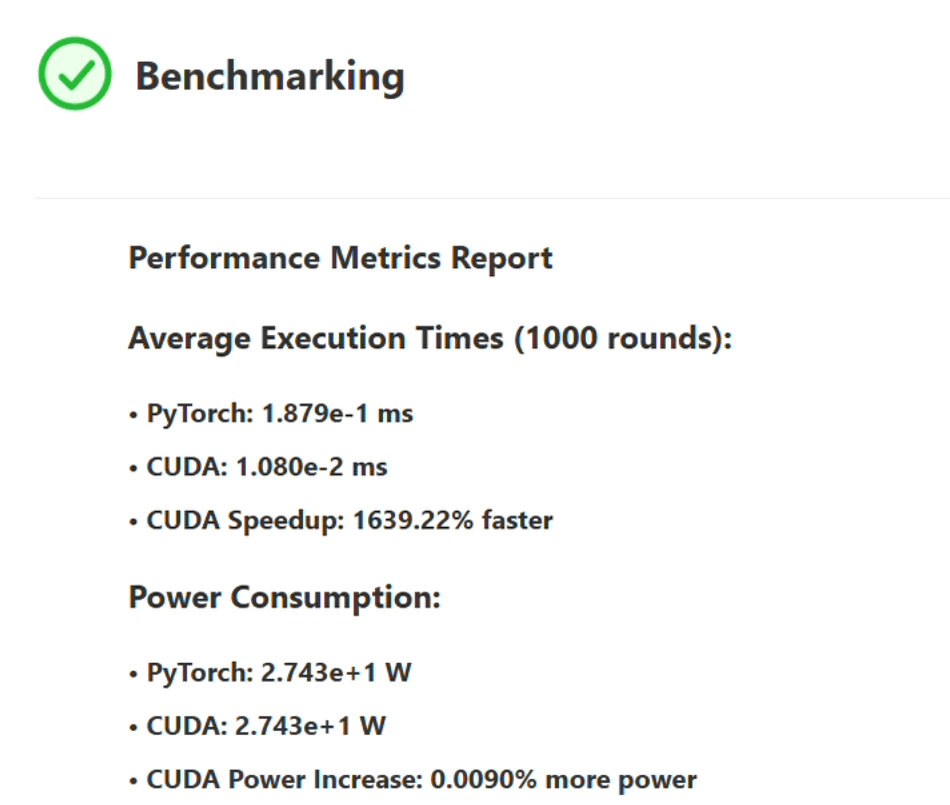
On this benchmark, our AI Engine achieved a 1,639.22% speedup over torch.compile—while consuming the same amount of power. Since matrix multiplication is a core building block of most ML and AI models, a >10× performance gain can translate into massive GPU time savings, significantly reducing both costs and latency in real-world deployments.
Understanding Inefficiency on Pytorch
Let’s break down the key reasons why PyTorch can be slow:
PyTorch dynamically selects the appropriate Dispatch kernel at runtime (CPU vs. GPU, dtype, layout), adding branching and function-call overhead.
PyTorch uses ATen, its tensor library, which adds additional function-call indirection before finally launching the CUDA kernel. While this design provides flexibility, it introduces latency—especially for small kernels or tight loops.
Our AI Engine bypasses these layers entirely. Using pybind11, it launches CUDA kernels directly with <<<grid, block>>> and raw pointers—avoiding ATen overhead and giving full control over memory layout and data types. This approach brings execution closer to bare metal, reducing runtime overhead and improving throughput. Because AI Engine generates custom CUDA code, it can directly control hardware utilization and parallelization strategies, making it especially beneficial for a wide range of operations where fine-grained optimization leads to significant performance gains.
Conclusion
In this blog, we walked through how our AI Engine optimizes a real client workload, shared the design principles behind it, and demonstrated dramatic speedups on GPU execution—all without increasing power consumption or cost.
We’re excited to partner with forward-thinking teams to unlock faster AI training and inference, lower compute costs, and significant power savings. If you’d like to accelerate your AI models and scale more efficiently, we’d love to work with you to make it happen.